Making Banking Decisions Simple, Smart and
finally Seamless
Transforming multinational bank's internal Client Exit Decisioning Management tool to reduce decision risk & drive faster outcomes.
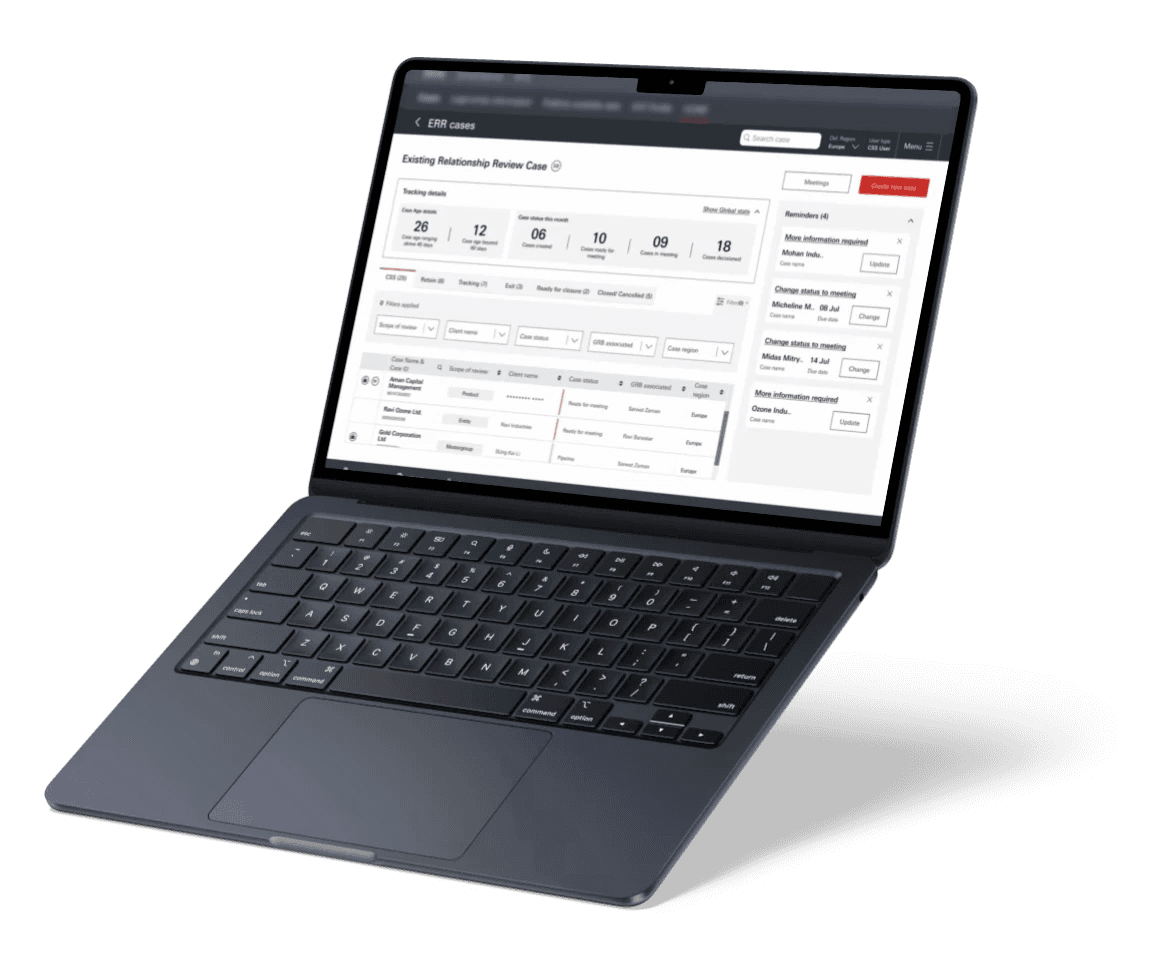
Simplifying decision-making through design, transforming complex, high-stakes client decisioning into a clear, confident, and data-driven experience.
Every minute counts
it’s a necessity.
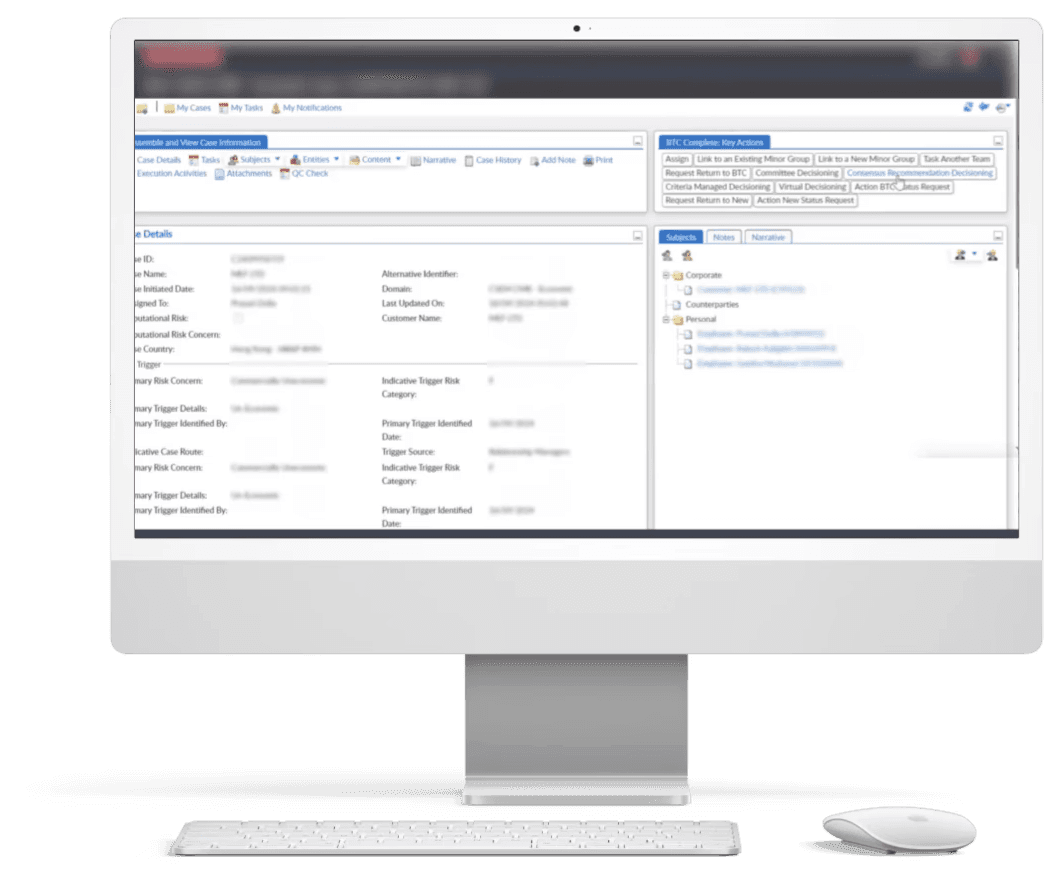
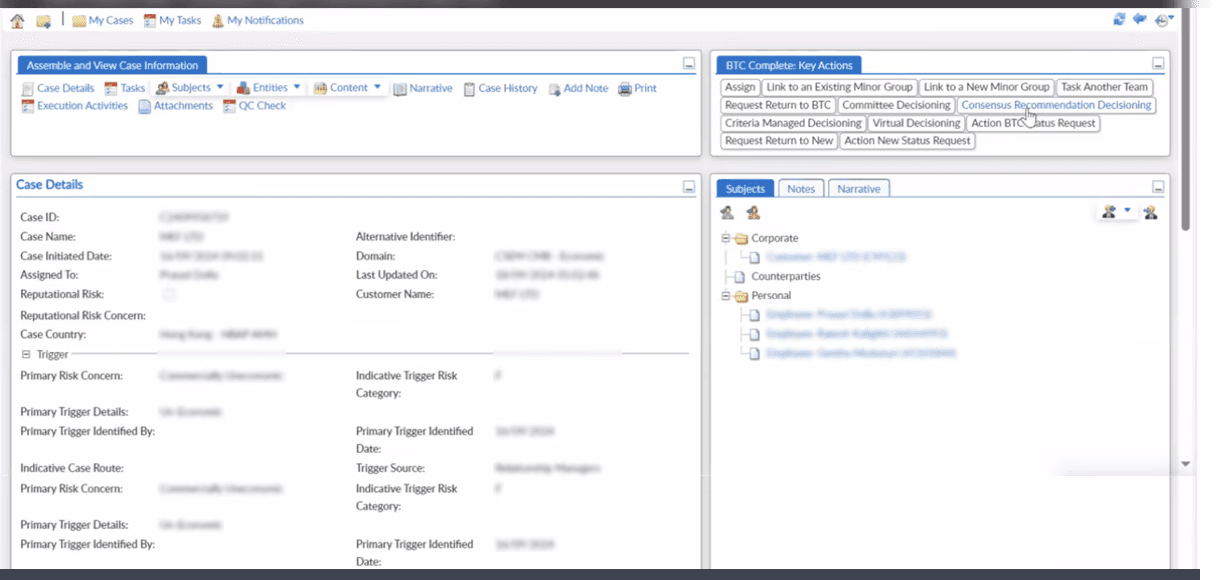
I am always so afraid of making errors with 1000 of cases incoming everyday




Delay is majorly because of multiple approvals & bottlenecks but they blame us.



I am new here & understanding my work has been tough. So many back & forth.



Just copy pasting information from 15+ different systems is so time consuming



What are users feedback in this existing flow?
Problem Statement
?
The Overview
The internal client decisioning platform operated like a giant Excel sheet and was primarily used to determine whether to retain or exit clients based on risk assessments.
Existing process & Workflow
The decision-making process was manual and fragmented, requiring users to cross-check information across more than 20 systems. Data had to be copied and pasted manually, and decisions were circulated offline through emails before final administrative processing.
Operational Challenges
Handling 1,000 to 2,000 cases daily created significant workflow strain, leading to frequent bottlenecks, data errors, and growing frustration among both users and decision makers
Role
Service design, UX/UI design, UX Research
Duration
8 months | Ongoing
Tools
Figma, Figjam, Figma Slides,
Team
1 designer, 1 PO, 6 BA, 20+ stakeholders, Tech team
Type
Internal platform
Division
GB (Global banking) & CMB (Commercial banking)
Success metrics
01
Reduction in manual effort – decrease in copy-paste tasks and redundant data entry.
02
Process efficiency – faster turnaround time per case (handling 1,000–2,000 cases daily).
03
Error rate improvement – drop in human errors from data duplication or mismatches.
04
Workflow unification – successful integration of two channels into one streamlined system.

GB, CMB, Mastergroup, Entities, LEBI
But what is
Global Banking
Focuses on everyday banking for businesses.
Services offered
Works as investment banking arm of HSBC, dealing with complex transactions
Customer base
Primarily multinational corporations
Cases received
50-100 cases per month. Cases grouped under Mastergroup
Master group
is a parent company profile that links all related client entities and accounts under one umbrella for easier tracking and decision-making.
Commercial Banking
Deals with large-scale corporate finance and investment banking activities.
Services offered
Provides lending, cash management & support for business growth & expansion
Customer base
Serves small, medium, and large enterprises
Cases received
5000-10000 cases per month. No grouping under any Mastergroup.
Entity
an individual company, branch, or organization that operates under a master group and holds its own accounts and relationships with the bank.
LEBI
refers to the detailed data and identifiers of a company — including its registration, ownership, and business structure. Used to assess and manage clients accurately.
LEBI (location)
A
A
B
C
Legal entities
Entity
A
B
C
A
B
C
Master group
A
B
C
A
B
C
A
B
C
A
B
C
A
B
C
A
B
C
What is the organisational hierarchy here?
Stakeholder mapping
Primary Stakeholder
Trigger initiator
CSEM Analyst
Team Lead
Secondary Stakeholder
Business partners
BTC partners
Execution partner
Global relationship manager
Product owner
Relationship manager
Relationship manager supervisor
Trigger identifier Trigger initiator
Trigger identifier
quality reviewer committee.
Global relationship manager
Committee
Quality reviewer
Trigger identifier
Business Partners
Team Lead
CSEM Analyst
Trigger initiator
Design Methodology for GB
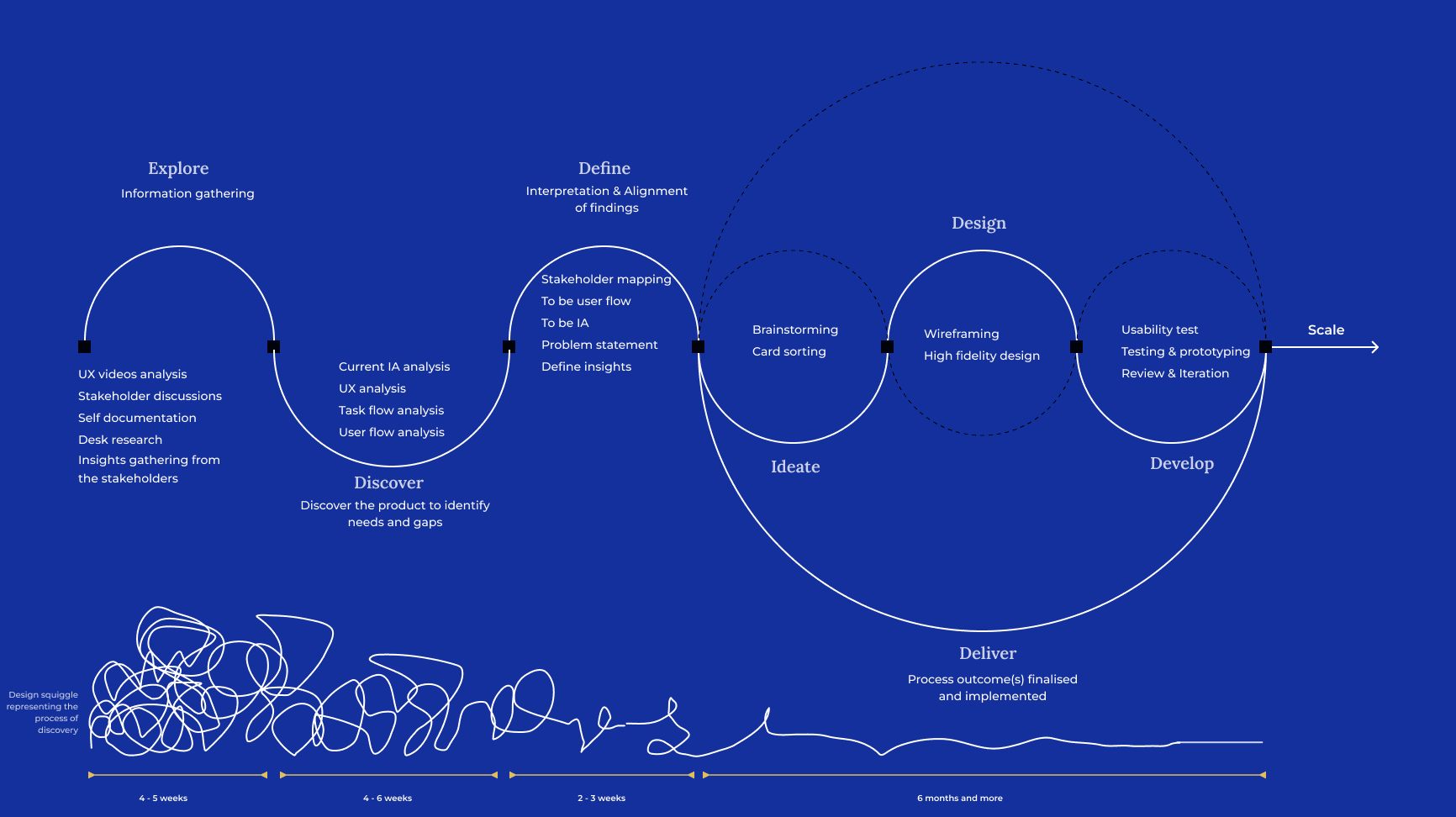
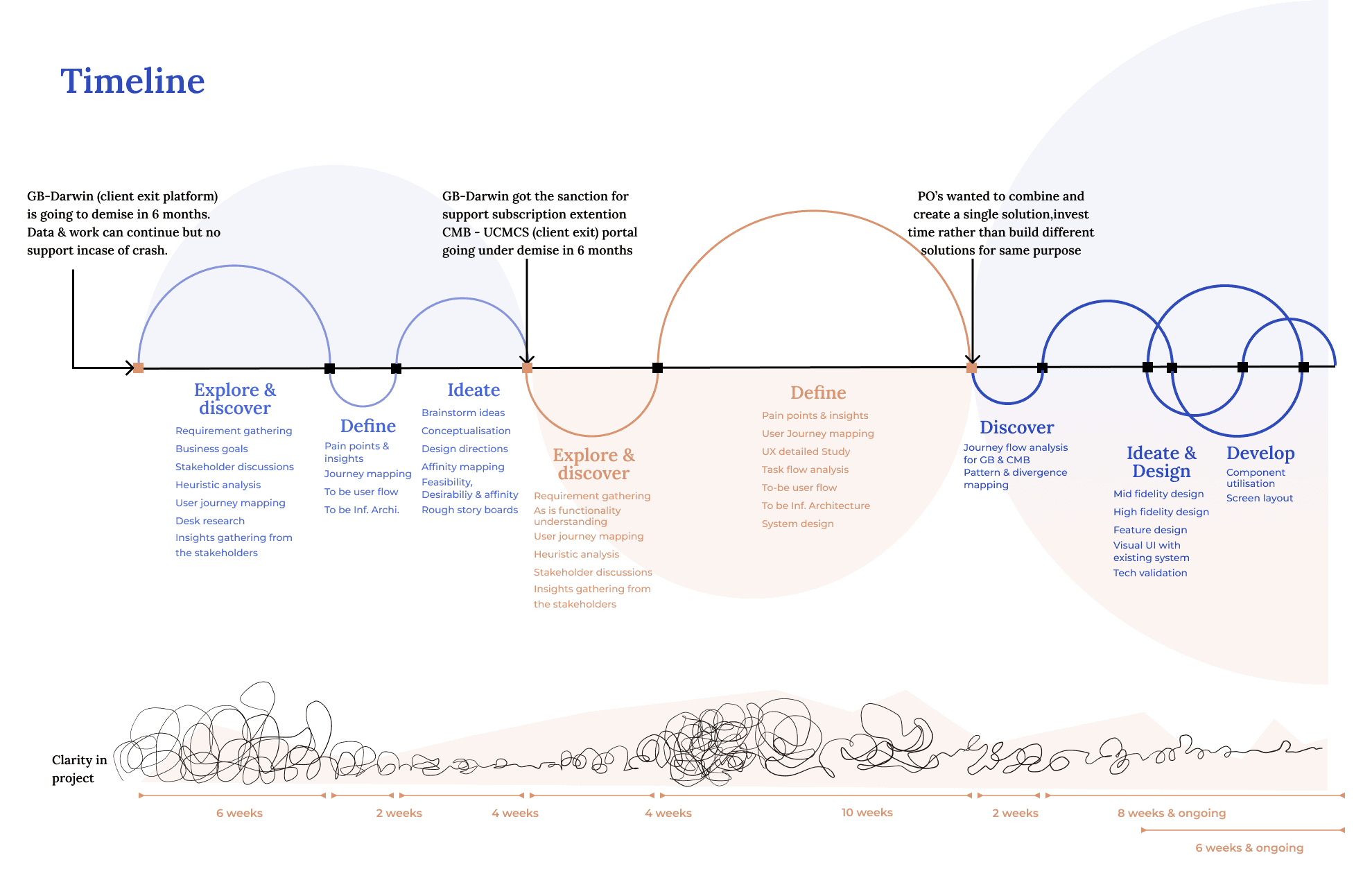
Combined Design Methodology
users & functionalities
Understanding
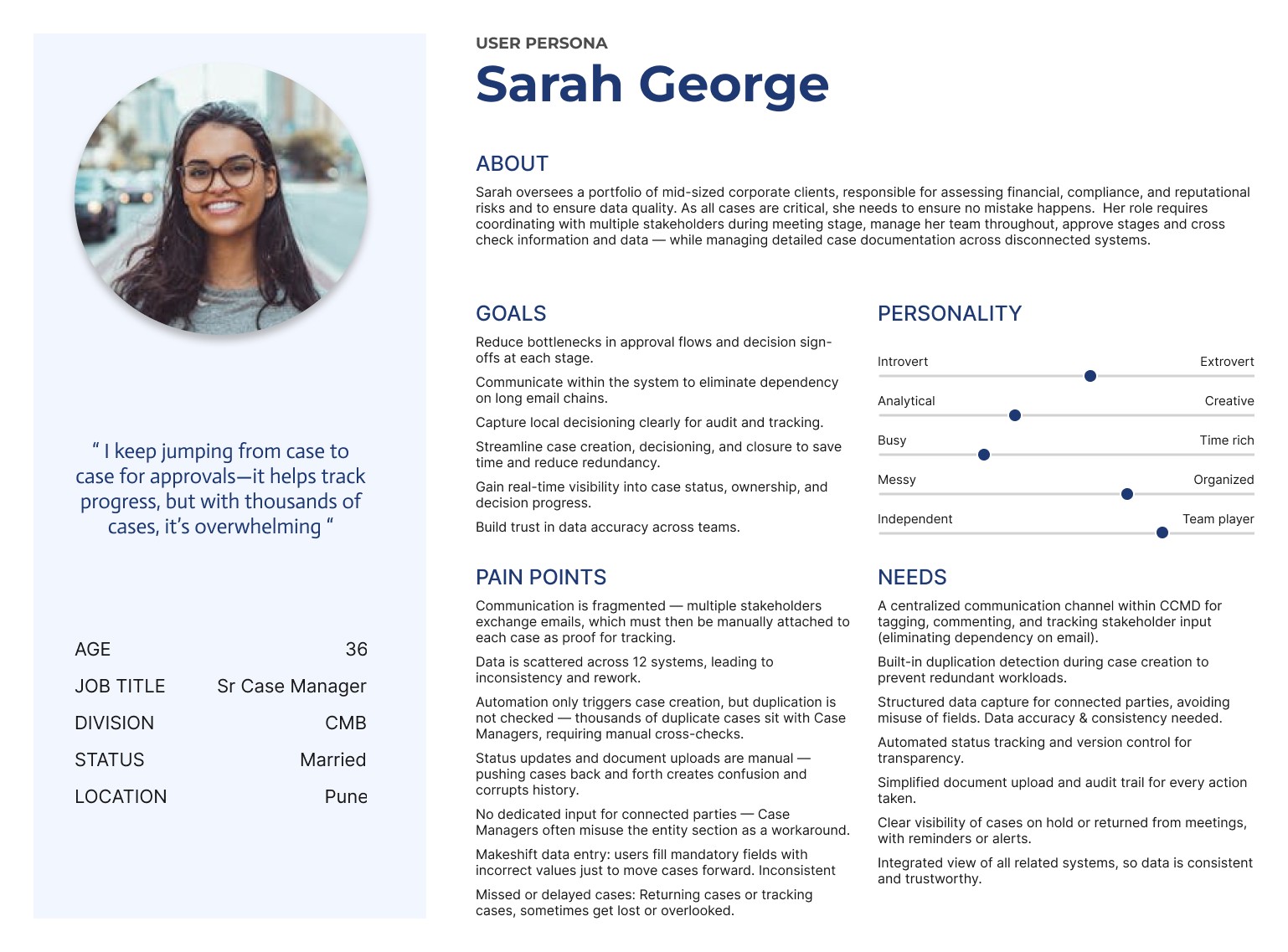
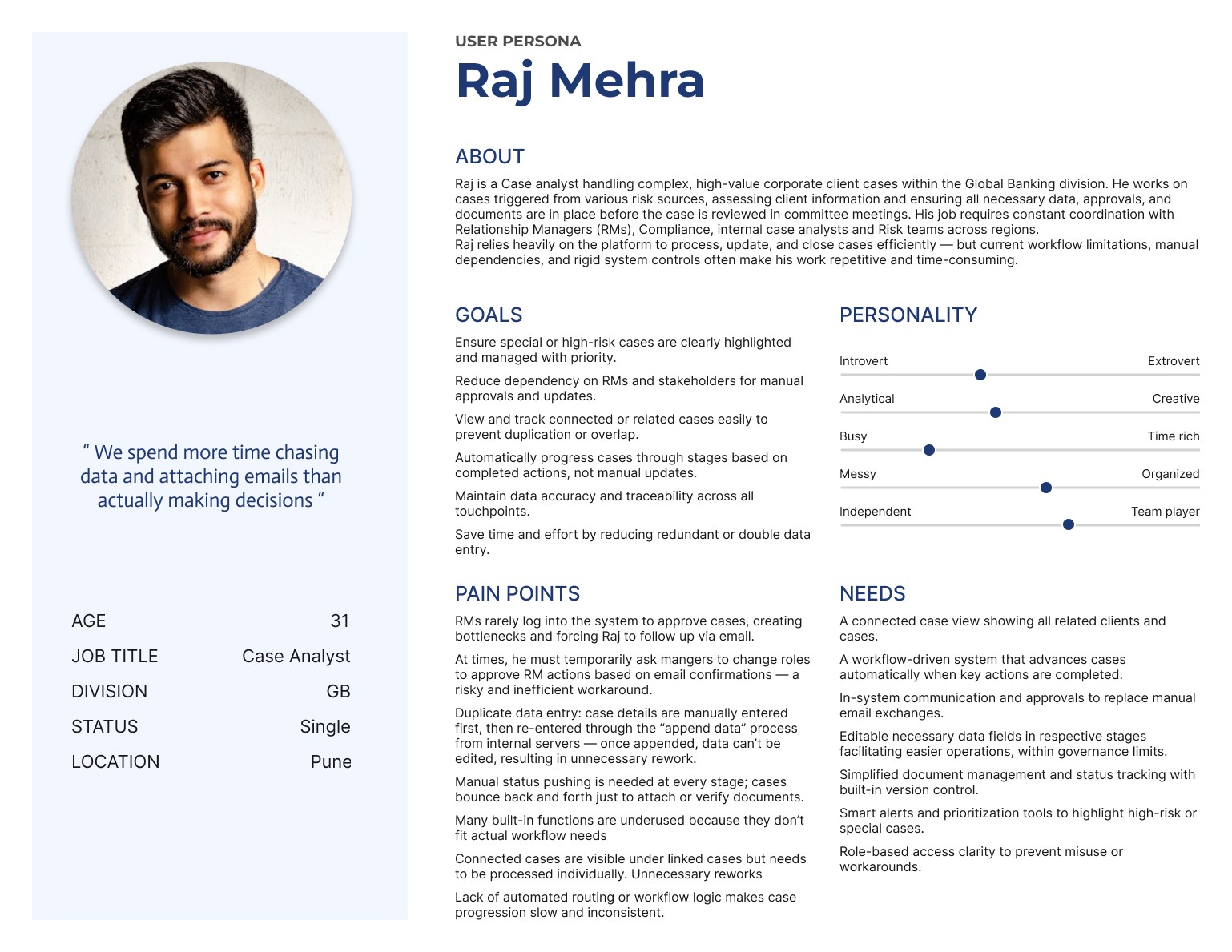
User Persona
Two user personas Sarah & Raj were developed to identify key pain points and stakeholder roles. Broader case scenarios & challenges were mapped to build a holistic understanding that guided the platform revamp.
Global banking GB - How do they function
GB relatively gets lesser cases as they are majorly grouped by mastergroups. There are many users who work on same case.
Manual intervention
Integrated system
Complexity involved
Triggered in UCM app which is not integrated with Darwin platform (GB Exits)
Manually start the exit decision case by copying information from UCM.
During case creation if same client has other cases, it is showcased so as to avoid duplication.
Trigger
At the trigger stage, the initiator provides basic client and in-scope entity/LEBI details, which the internal analyst uses to create the case in Darwin.
The data lake is integrated with Darwin and hence all client data is automatically populated in an excel.
The collated data sheet is manually set to the RM’s for confirmation.
BTC
Build the case step involves collating key information such as client details, associated entities, LEBIs, account data, connected parties, transactions, and account balances to enable informed decision-making.
Once a case gets picked up in meeting, based on regional or global, the committee decides on actioners and meeting happens offline.
Only the information of the decision of all cases is provide to the analyst so as to input in Darwin.
Meeting
In the Meeting stage, multiple cases are reviewed offline. Decisions are shared via email, and only captured later in Darwin by the analyst.
The decisioning happens online but based on the decisioning the route the case takes is quite complex.
Decisioning
n the Decisioning stage, cases are marked as Retain, Exit, Partial Exit, or Tracking. Based on the need for local decisioning, they progress accordingly.
Other cases based on local decisioning equirement follow a complex process of more decioning people.
Execution
In the Execution stage, Exit-designated cases move to CODI for processing. Upon completion, updates are reflected in Darwin.
Exit or partial exit (few out) cases will go for execution. The execution team longs in darwin and updates info.
Once execution is complete with all products removed, the case automatically gets updated.
Commercial banking CMB - How do they function
Manual intervention
Integrated system
Complexity involved
Numerous manual interactions in the complex process causes delay & decreases the efficiency.
Automated triggered received from 3 different sources. Receives average of 500-1000 cases daily.
Numerous duplicate cases created and later manually validated
Details received based on triggger initiator input. Manual Data validation
Trigger
At the trigger stage, the initiator provides basic info and triggers case. Information cross checked and appended by internal analyst in the UCMS system.
The data lake is integrated with Darwin and hence all client data is automatically populated in an excel.
The collated data sheet is manually set to the RM’s for confirmation.
BTC
Build the case step involves analyst to manually collate all information such as client details, account details, connected parties from 6 different sources.
After getting approval, case moves to meeting and no data is captued in system
Analyst or users are not aware of he meeting process. Their touchpoints is only initial and at the end.
Meeting
Meeting happens offline and only most recent meeting data is captured as it appends over the previous.
The decisioning happens online but based on the decisioning the route the case takes is quite complex.
The outcome is received through mail and analyst updates details to proceed the case ahead. Complexity increases based on type of case.
Decisioning
In the Decisioning stage, cases are marked as Retain, Exit, Partial Exit, or Tracking. Based on the need for local decisioning, they progress accordingly.
The decisioning happens online but based on the decisioning the route the case takes is quite complex.
The outcome is received through mail and analyst updates details to proceed the case ahead. Complexity increases based on type of case.
Execution
In the Decisioning stage, cases are marked as Retain, Exit, Partial Exit, or Tracking. Based on the need for local decisioning, they progress accordingly.
Action Inventory and Dependency Review
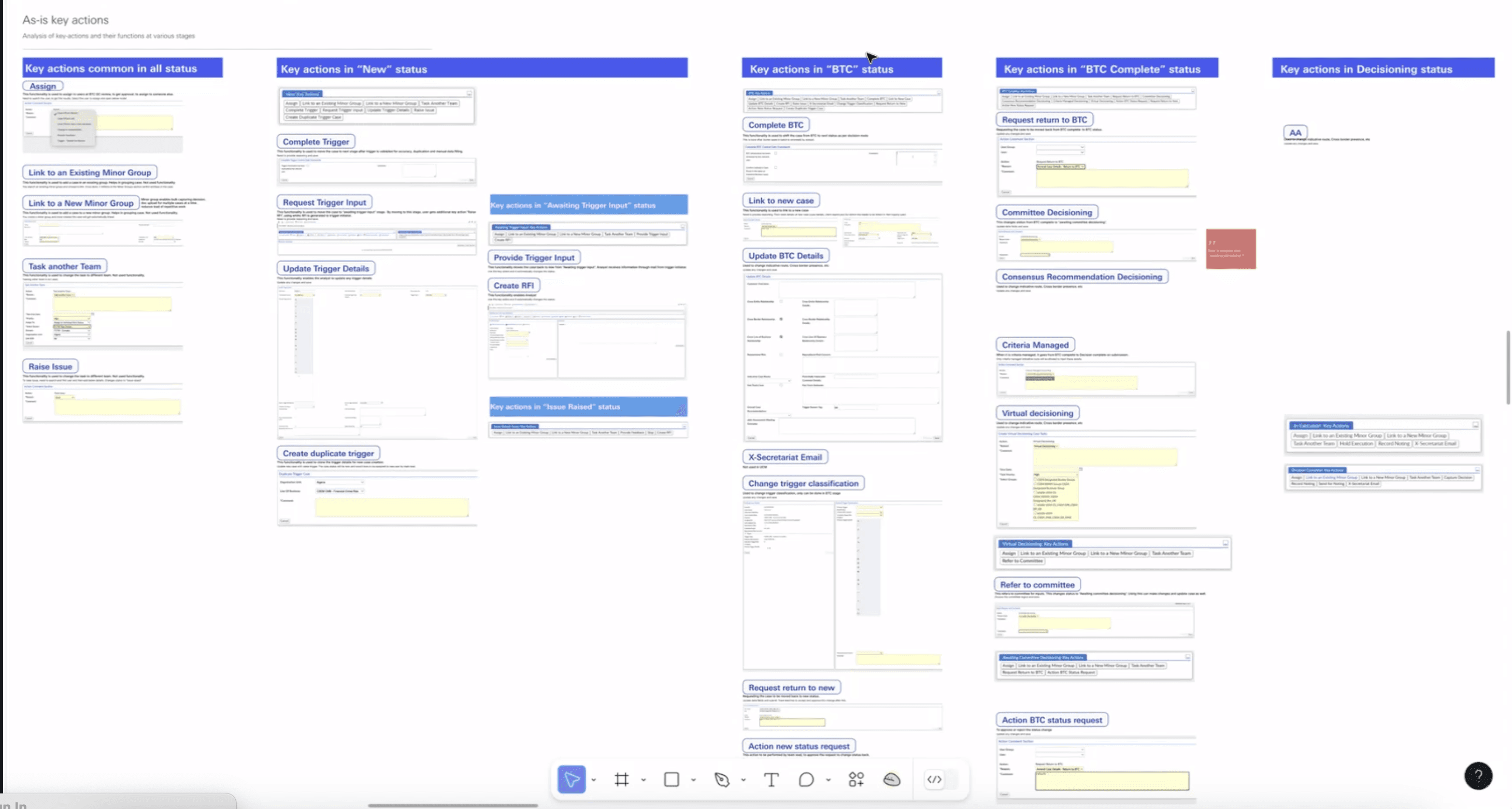
GOAL
To analyze and map all key user actions across each stage of the client decisioning workflow.
To understand interdependencies, user roles, & control points impacting system behavior.
ANALYSIS
Detailed review of stage-wise actions performed by different user types.
Identified multiple interdependent actions critical for decisioning and control.
Examined access control and maker-checker mechanisms tied to sensitive client review processes.
OUTPUT
Mapped numerous maker-checker, access-controlled actions linked to manual processing and quality control.
Detected redundant or unused actions at certain workflow stages, leading to vague error messages.
Highlighted system inefficiencies
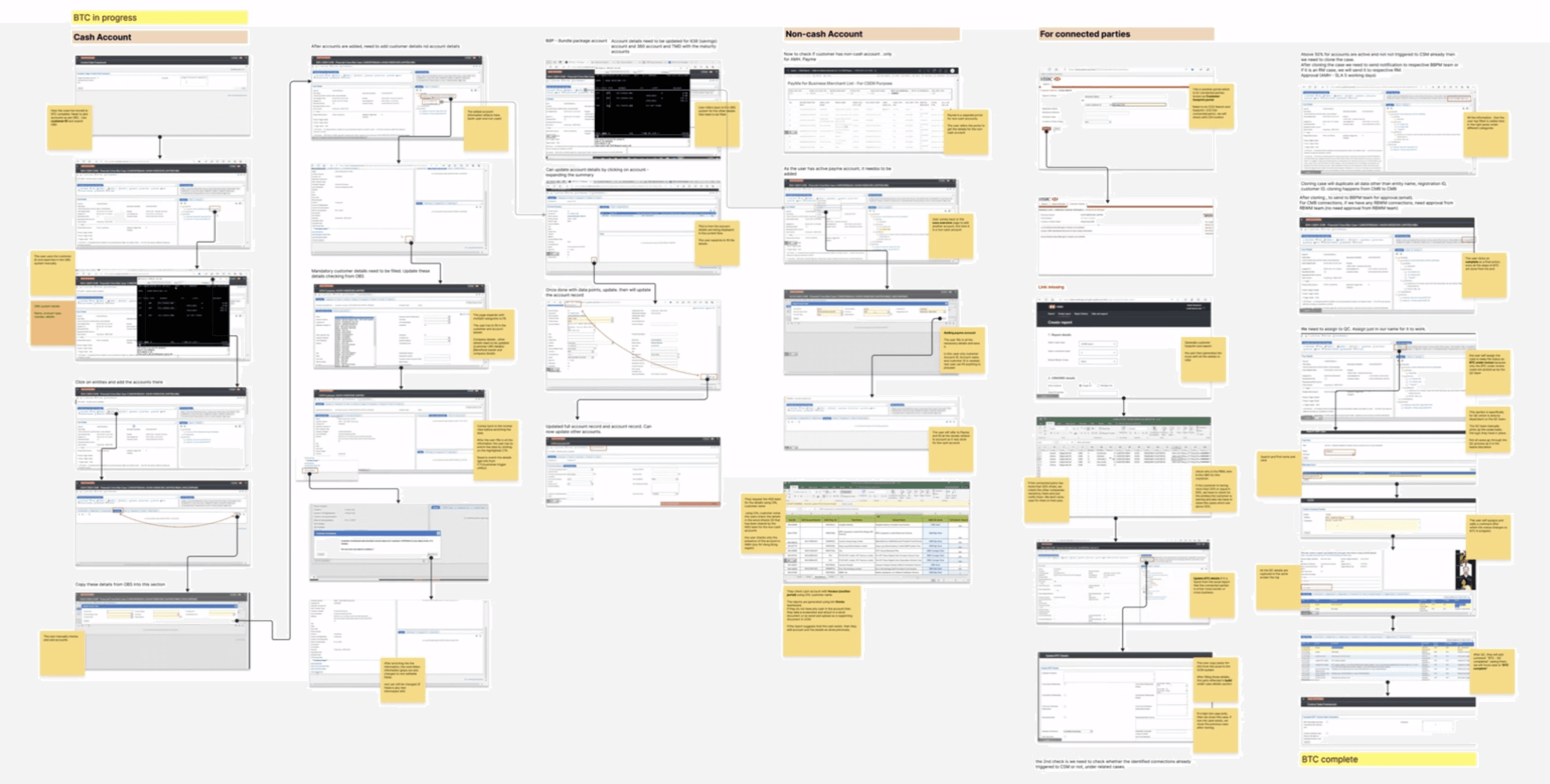
End-to-End Journey Analysis: Actions, Insights & Barriers
GOAL
To map the complete user journey for both GB and CMB, identify touchpoints, data usage, and system integrations, and detect inefficiencies or unnecessary data overload.
ANALYSIS
Mapped step-by-step workflows; GB and CMB were very different.
Captured all screens, user touch points, and system integrations.
Tracked data usage & sources to identify critical vs. redundant information.
Documented full end-to-end flow to understand process flow & dependencies.
OUTPUT
Comprehensive user journey maps for GB and CMB highlighting key interactions and integrations.
Identified critical vs. non-essential data to reduce information overload.
Clear visualization of process flow to pinpoint potential pain points and inefficiencies.
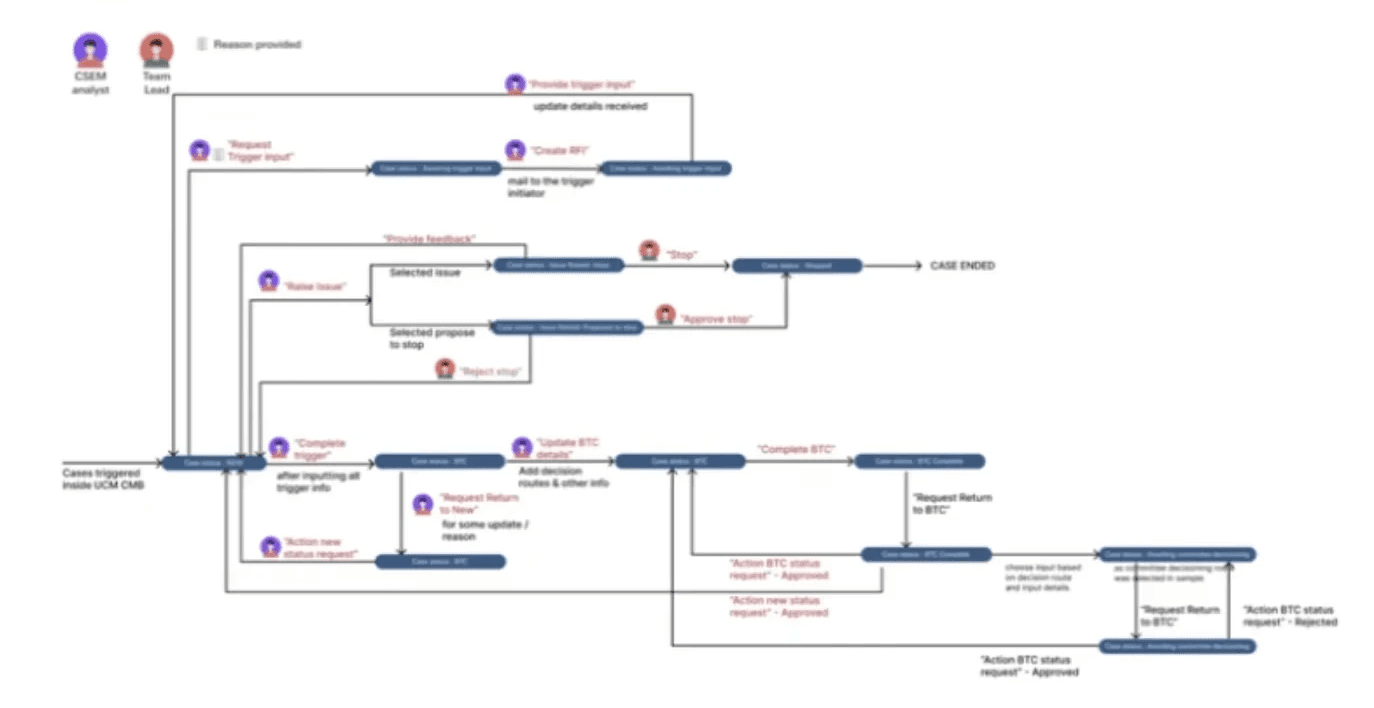
Status flow Analysis
GOAL
Understand how status changes occur across actions, identify triggers and controls.
Detect gaps causing confusion or workarounds.
ANALYSIS
Mapped status changes triggered manually or by different actions.
Studied controls, restrictions, and dependencies at each status.
Examined how minor updates were captured.
Tracked user behavior when functions were restricted after certain statuses.
OUTPUT
Status changes are often confusing, with unclear triggers.
Many minor updates are not captured, especially in the decision stage.
Users create workarounds due to restricted functions after certain statuses.
Overall workflow shows gaps in tracking and process clarity, leading to inefficiencies.
User flow mapping - GB & CMB
What is the main goal or task the user is trying to accomplish?
What triggers the user to start this journey (motivation, pain point, external event)?
Where is the entry point for different users? How do they communicate?
What obstacles or points of friction are they experiencing?
What steps can be removed or simplified?
GB As- is user flow
Details of all users and their activity, showcasing their inter dependency within the process
Initiate request
Initiation
Review and process
Setting meeting
After decisioning
Regional CSEM
Creation of pre-decision template
Creates the pre decision template with the details of the Mastergroup and its details and submit to Global WCSEM
Regional CSEM
Receive reminder after a stipulated time
Reminder sent to RCSEM and they send case details to global to create meeting
Case status: Re-review
Dachboard: CSS
Regional CSEM
Global WCSEM
RCSEM team or meeting committe will send meeting information
based on type, wither regional or global will create meeting with information received.
Global - for cases belonging to different countries in a meeting
Details filled in pre-decision template (email)
Mandatory inputs:
Date case was triggered in UCM portal
GRB contact details
Mastergroup name
Mastergroup location
Scope of review (MG/ LE/ Product)
Case type
Trigger raised by
Trigger summary
Risk concern
Meeting creation
Meeting date:
Meeting region:
Meeting type:
Meeting title (auto populated):
Add cases for discussion
Submit meeting for approval
Case status: Ready for meeting
Meeting
Meeting status: Pending
Meeting status: Agenda approval pending
Meeting status: Agenda rejected
Case created
case created in DARWIN on approval and reflects in dashboard accessible by Global WCSEM & GRB (group relationship banker)
Case details:
Unique case ID
Case name(which is MG by default but editable to hide for MNPI cases)
MG name
Primary case region
Trigger lcient scope
comments
Send th case details as pdf to GRB for review. GRB has DARWIN access but doesnt login just to review and approve. Bottle neck. so email and get approval on mail. save mail in file.
UCM Portal
GRB/ SME triggers for exiting client from UCM Portal
GRB
GRB & BTCC team review the details
As all relationship with the mastergroup is maintained by GRB, she checks all the data & chooses the LE in scope. In case of missing data, send request to MSG team to add it.
Different BTCC submit questionnaire. On submission of all BTCC team, status automatically change.
Case status: BTCC review submitted
Dashboard: CSS List
GRB
Provides questionnaire
Include all responses within it. AFter reviewing all BTCC recommendations. Submit
Case status: Ready for meeting
Dashboard: CSS List
Case status: GRB rejected case
ADMIN
MSG Updates
On getting request from GRB, they add the details in associated MG.
CSS Supervisor
Supervisor review the meeting agenda
Approve/ Reject details provided by the supervisor
Meeting status: Agenda approval pending
CSS Supervisor
Approves meeting
Reviews and approves
Meeting status: Verified recorded decisions
CSS Supervisor
Approves the closure
Reviews and approves
Case status: Case closed
CSS Supervisor
Approves the closure
Reviews and approves/ rejects. Case closed on approval
Case status: Case closed
Cases go to decisioned list
All cases go to decisioned list by default
Case status: Decisioned
Dashboard: Decisioned
Input this info based on details received
Case status: Ready for closure
Dashboard: Ready for closure
remains in same status until the tracking end date. reminder sent to Reg. CSEM
Case status: In execution
Dashboard: Execution
Decision from local authorities gathered offline. Mail/ Call
Decision from local authorities gathered offline. Mail/ Call
Decision outcome case
Decision outcome case is created to record all exit activites (child case)
Decision to another meeting
Case status: Re- review
Dashboard: CSS
Decision to another meeting
Case status: Re- review
Dashboard: CSS
Approve meeting
Gloabl meeting, approved by global CSS supervisor and regional meeting approved by CSS supervisor.
Case status: Ready for meeting
Meeting status: Agenda approved
Meeting conducted offline
CSS Supervisor is the point of contact for the meeting. He schedules who should participate. It is not mapped in system
Meeting status: Record meeting minutes
Regional CSEM
Global WCSEM
Input decisions
Decisions taken in the meeting are inputted
Meeting decision
Decision rationale
Decision scope comments
Exit category
CS Tracking conditions
CS tracking reminder date
Meeting status: Minutes approval required
Meeting status: Minutes rejected
Global WCSEM
Review details
On checking all the details, the WCSEM approves and creates the case or rejects and send it back to RCSEM for more information. Fetches MG form
Global WCSEM
Receive the exit letter
Upload the letter and change status
Case status: Ready for closure
Dashboard: Ready for closure
Re- review
Case status: Re-review
Dashboard: CSS list
Global WCSEM
BTC (Build the case)
Generate review file containing MG and all its legal entities (excel file) to GRB. 4 email to GRB with pre-decision template, LE excel, Risk report. GRB to confirm the LE’s in scope for review. Case status changes automatically
Case status: Under BTCC review
Dashboard: Under BTCC review
Email trigger details
Rejected agenda
Rejected Minutes capture
RETAIN
RETAIN UNDER CS TRACKING
EXIT
MEETING DECISION
No decision made
Client exit execution begins in CODI
Not required
Not required
To retain
Agree to retain under tracking
Required
Required
Not retain
Not agree to retain under tracking
Approve agenda
MOM captured offline and shared through mail
Reject case
Accept case. need to fill the questionnaire
While adding case, add in respective sections. New, Re-review, Noting
Agenda pack and eshare link shared to meeting attendees - email
Agenda pack shared through mail
GRB & BTCC assigned to the case
Local decisioning
Local decisioning
Case status: In execution
Dashboard: Execution
Case status: In execution
Dashboard: Execution
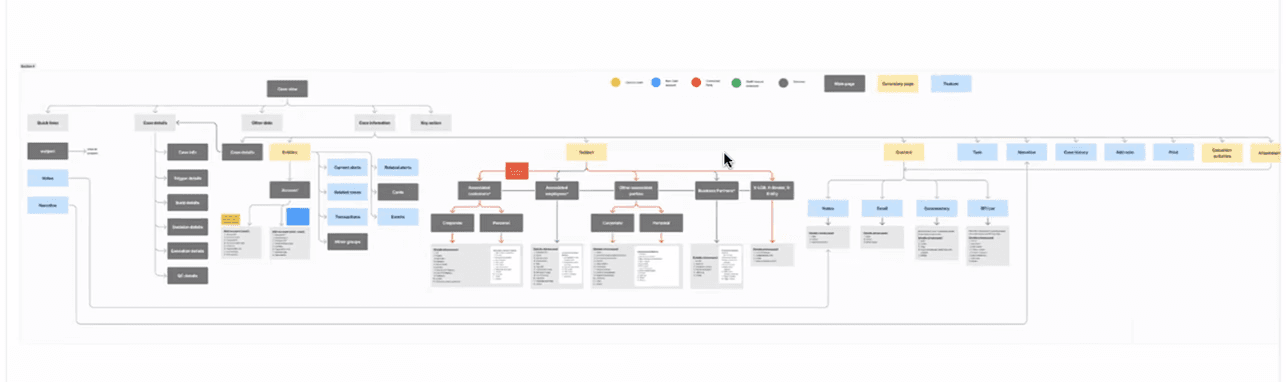
Information Architecture
This revealed opportunities to merge overlapping workflows, clarify user roles and simplify navigation across the platform.
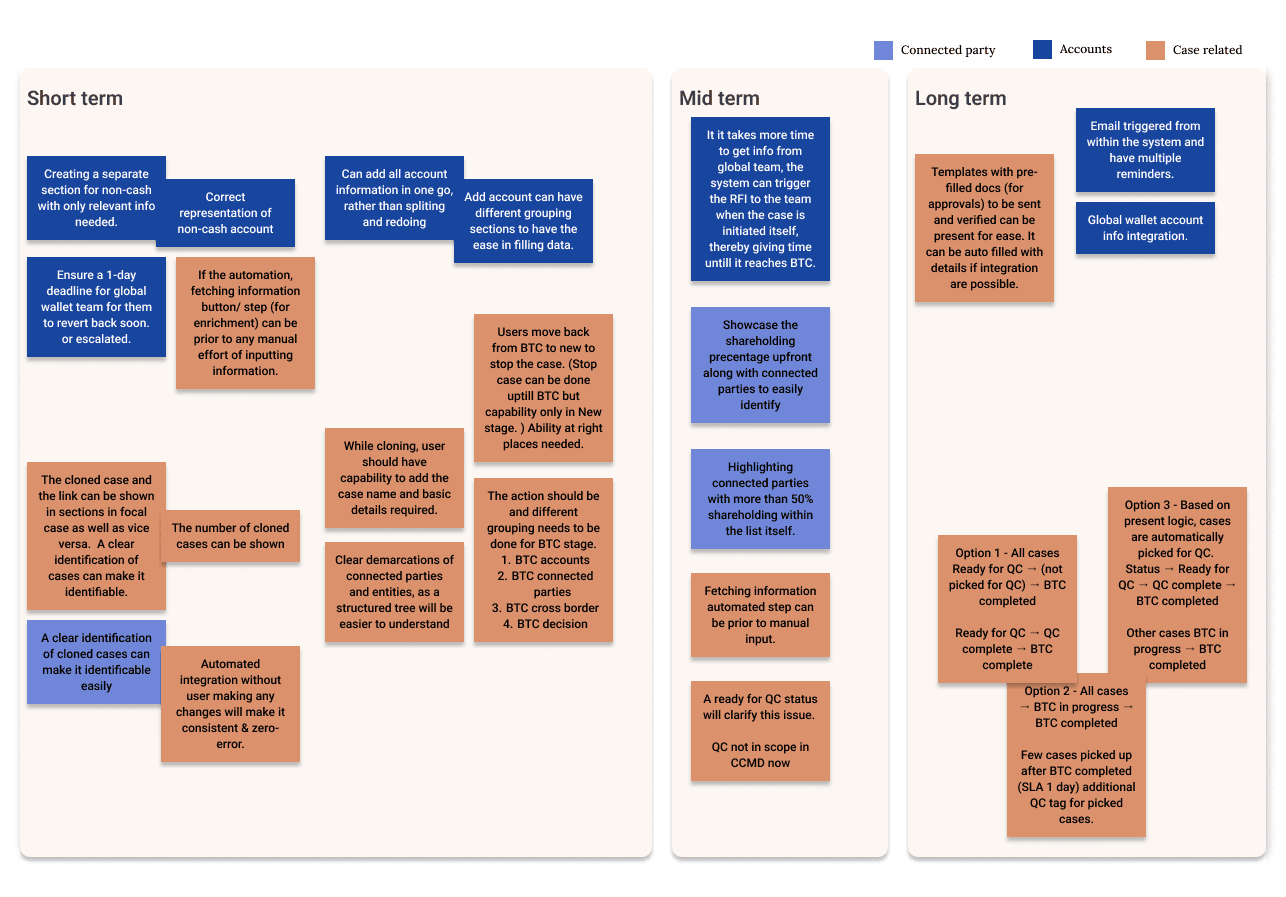
Ideation & Brainstorming
Balanced innovation with impact—aligning what users want, what’s possible, and what drives business value.
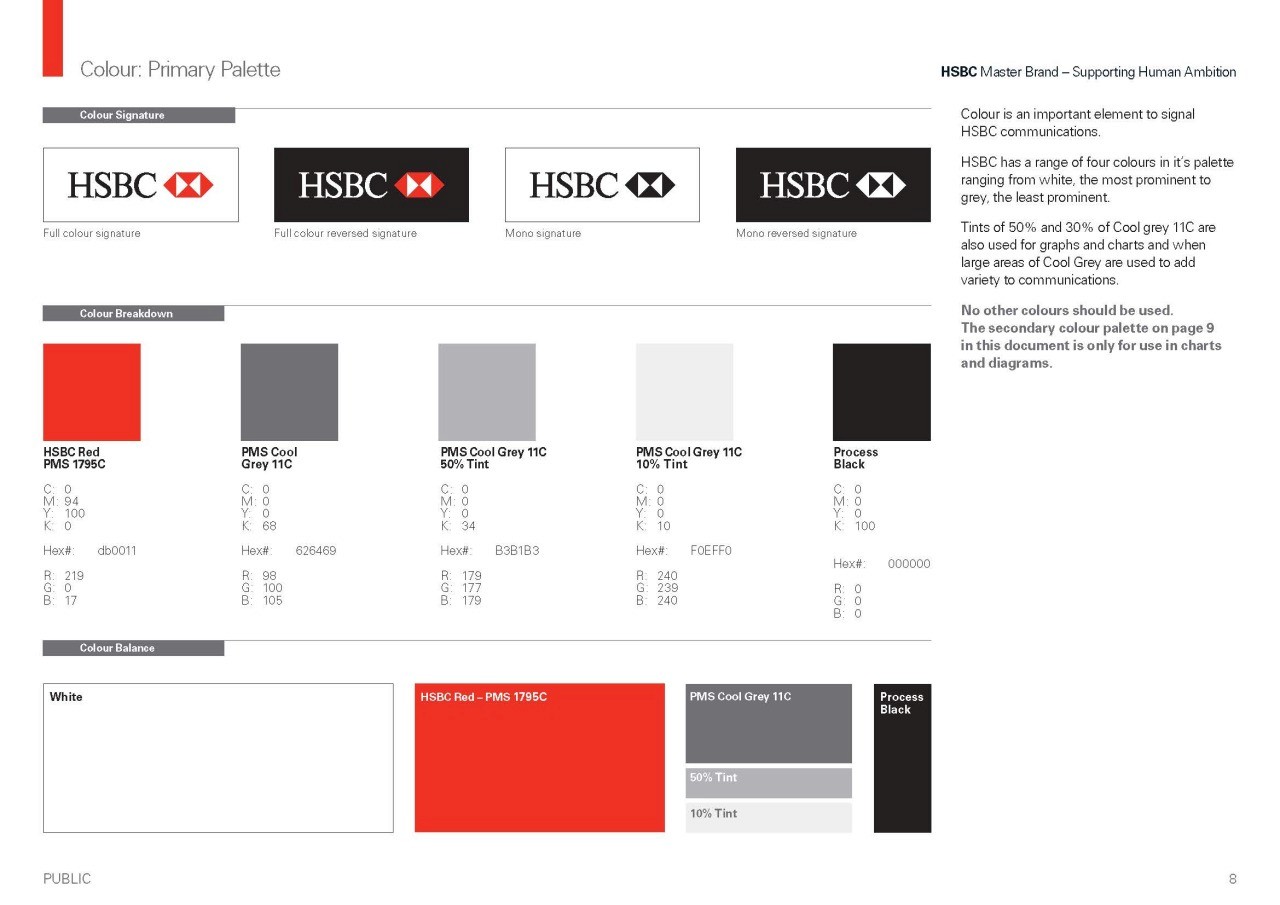
Syle guide
Utilised HSBC’s existing design system & global style guide to ensure visual consistency and accessibility. The established design standards guided component usage, color hierarchy & interaction patterns - helping maintain brand coherence while enhancing usability across the new platform
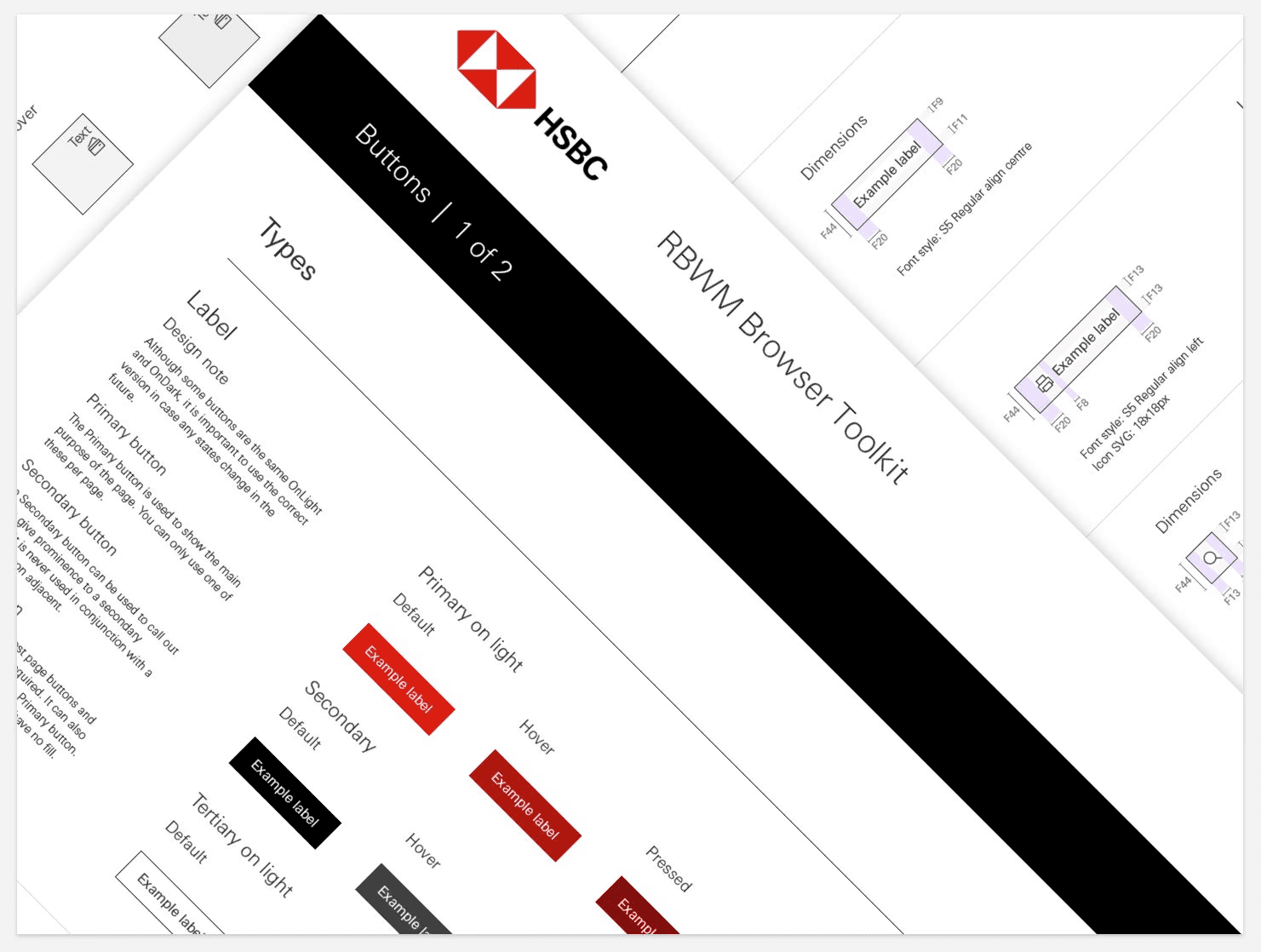
Component structure
Built on HSBC’s global design system, ensuring consistency across internal tools. Systemized component library guided by established design and accessibility principles. Built few specific components for CCMD.
to DESIGN
Lets then get
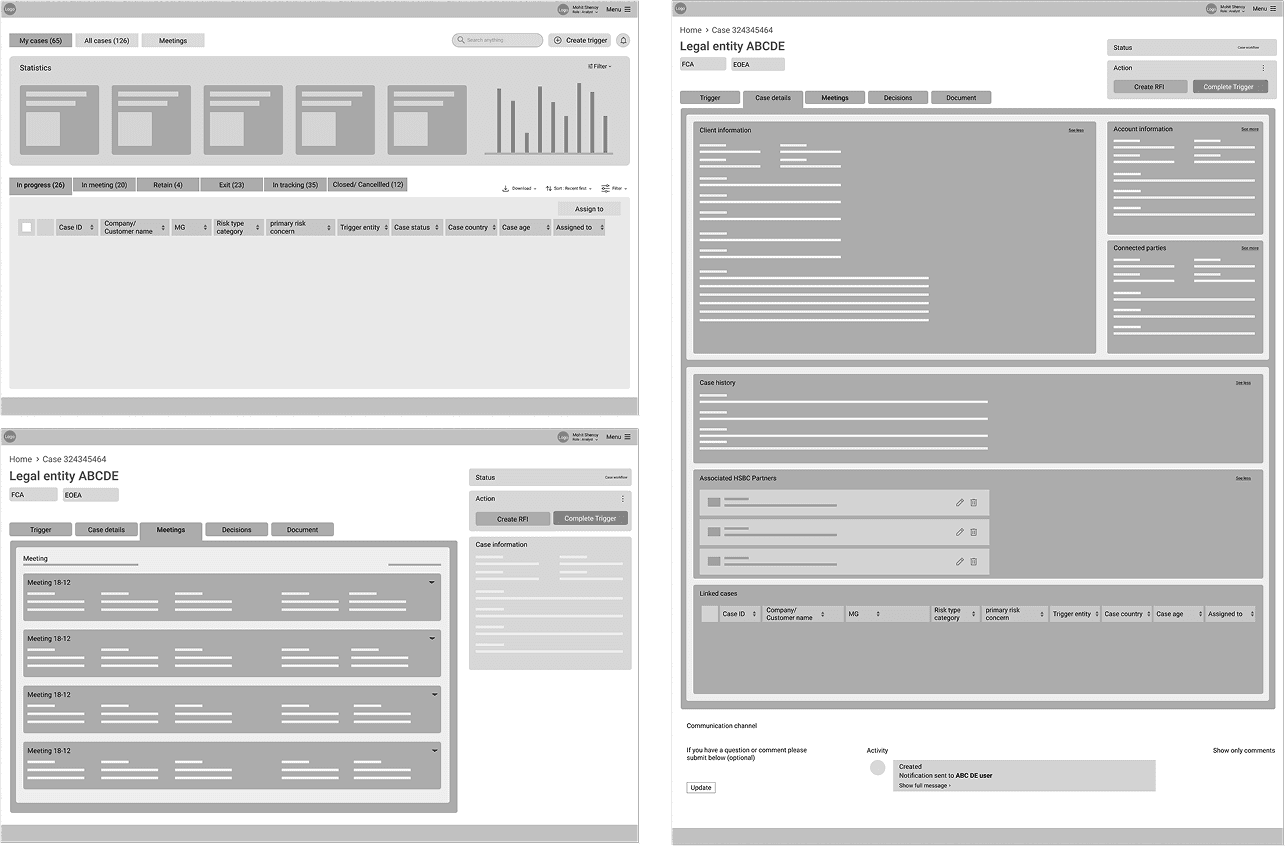
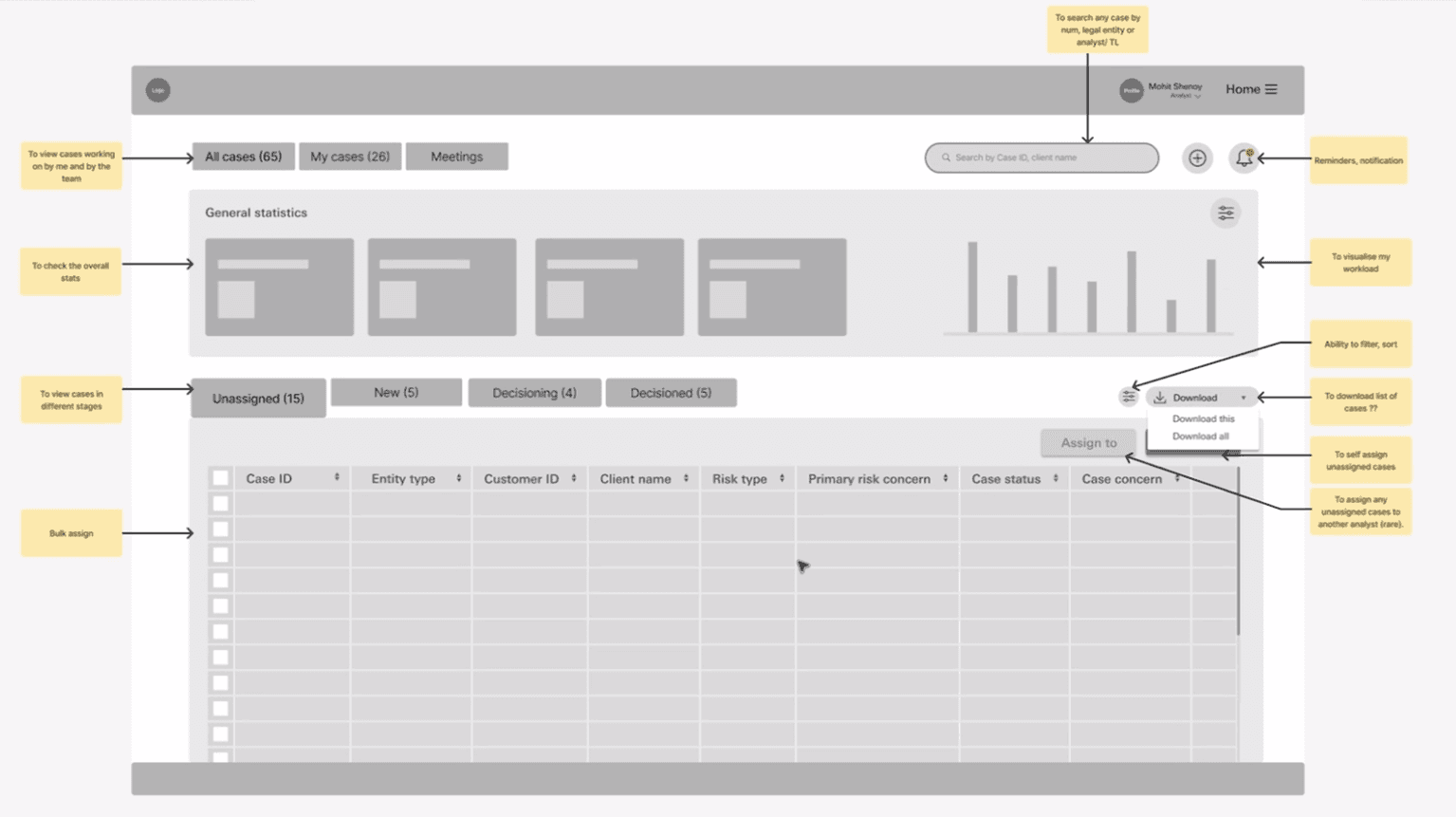
Low fiedlity layouting
Before
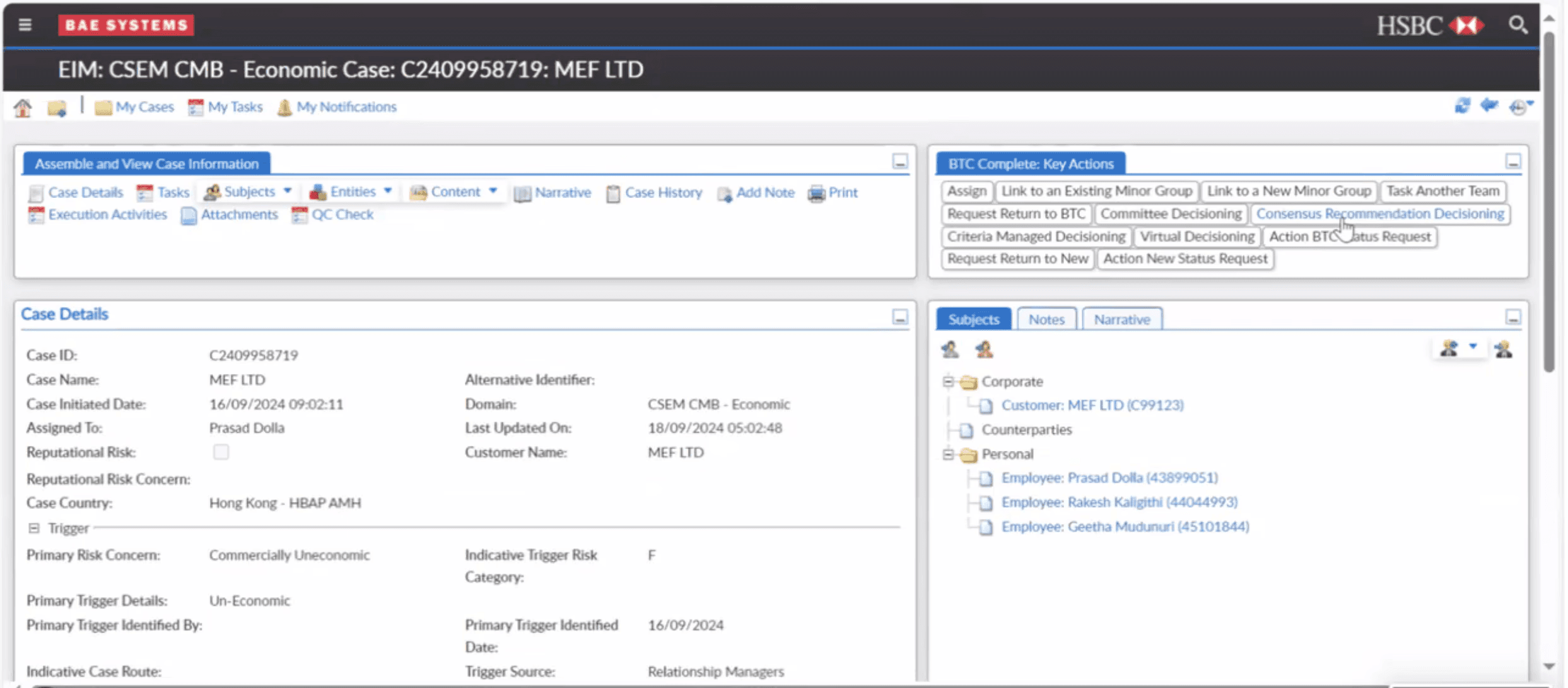
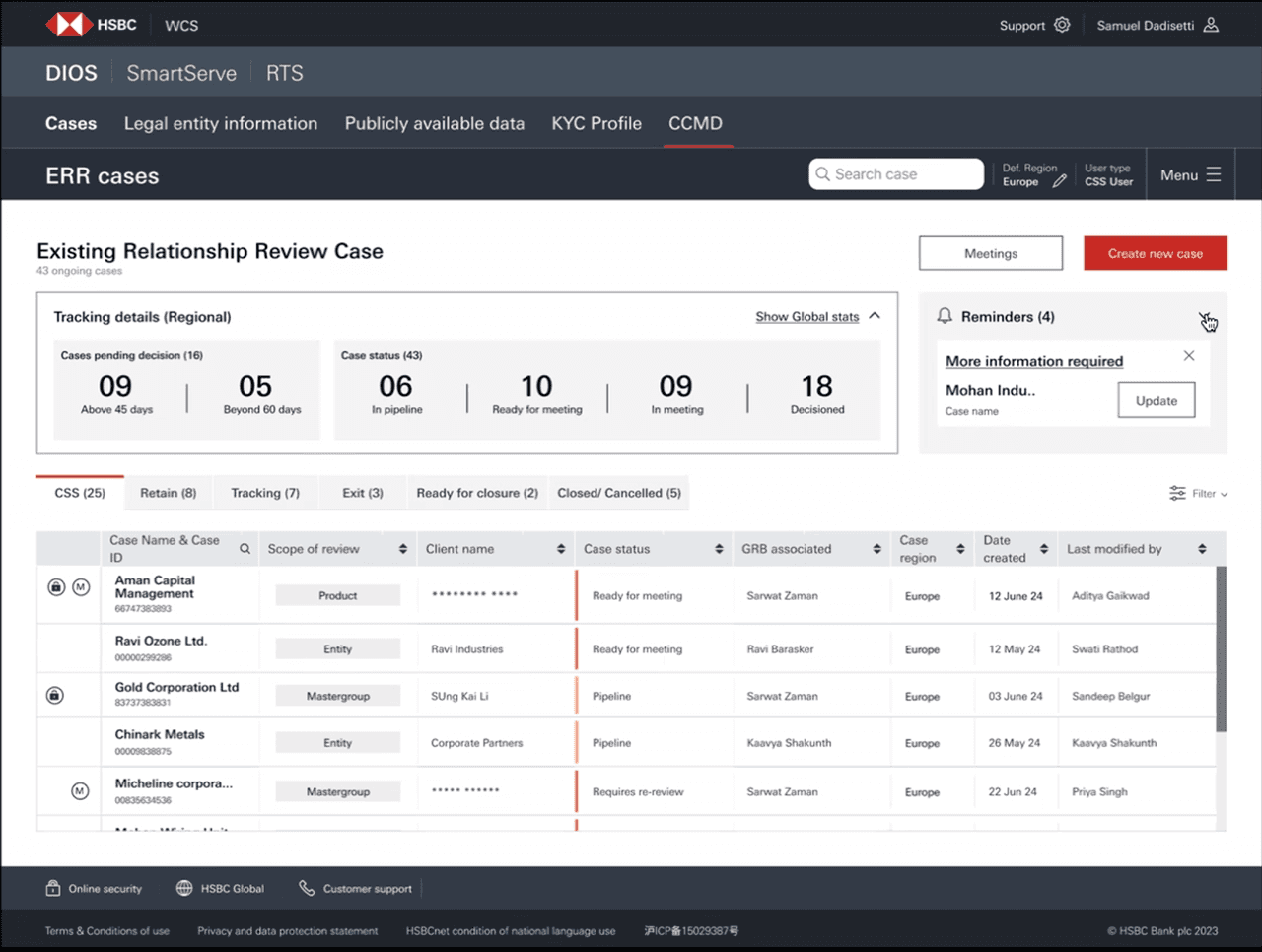
After
43%
Increased workflow efficiency
Journey mapping revealed redundant handoffs and duplicate data entry points which we reduced and re-sequenced for clear responsibilities
Role-based dashboards & relevant views: Each role only viewed relevant fields and actions
Pre-filled data & intelligent defaults: Users didn’t have to lookup and re-enter.
Reduced cognitive load through IA: Simplified and surfaced the next-best action prominently.
Actions & approvals from within the system: Unnecessary proof doc upload not needed
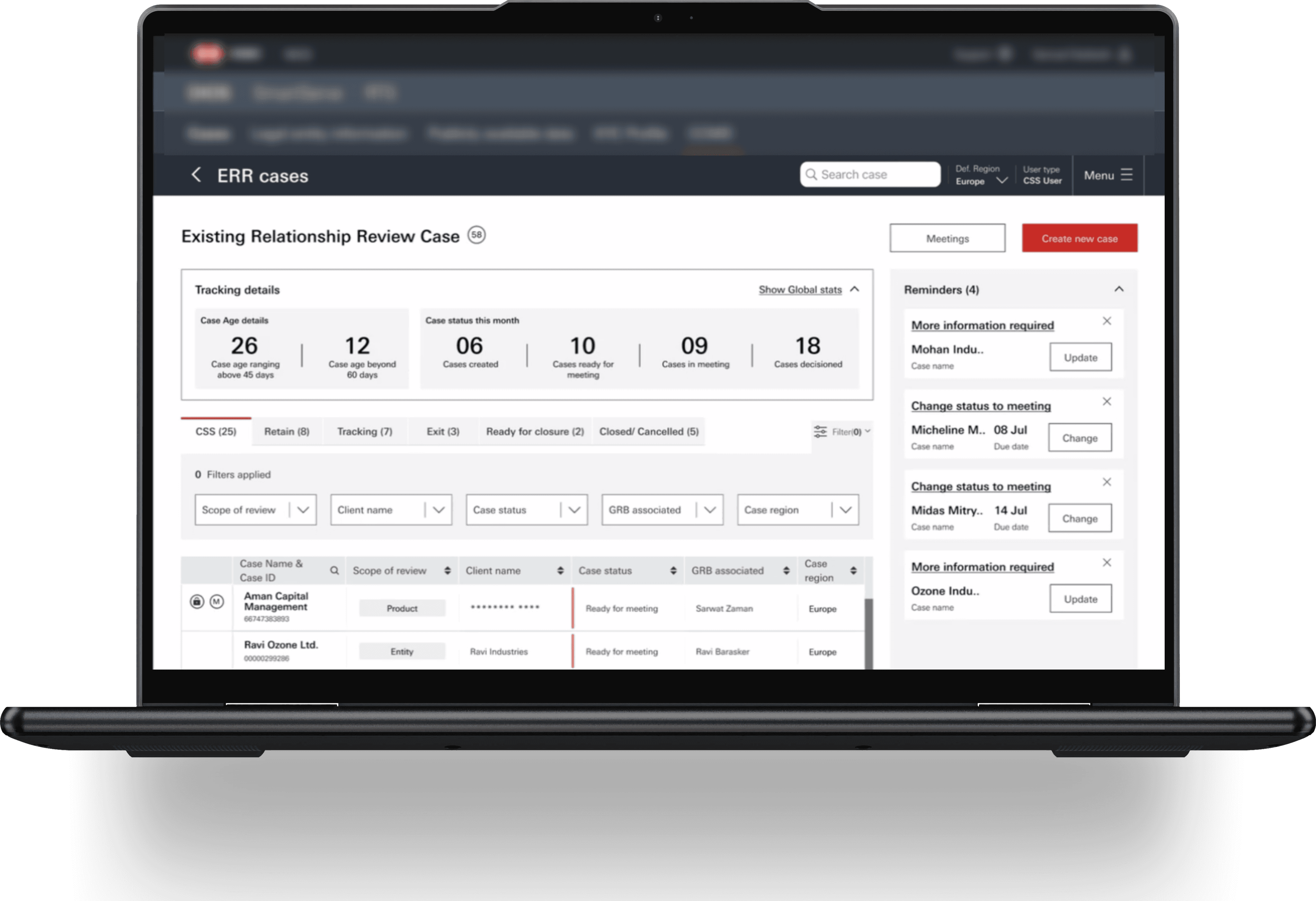
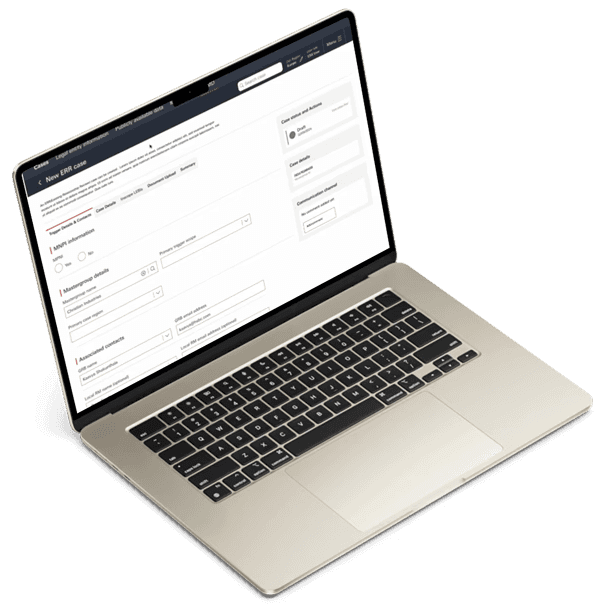
56%
Reduced makeshift workarounds
Removed need for external tools: Built-in audit notes & external action request so users no longer used email/Word/Excel to communicate.
Robust error handling & offline sync: Implemented validation feedback & reduced duplicate cases automatically.
Clear error states & recovery flows: Exact validation errors and suggested remedies inline.
Single source of truth & permissions model: Eliminated maker-checker scenarios-bottlenecks
Single streamlined flow - Status back & forth removed o maintain flow accuracy
32%
Decreased processing time
Reducing manual load: Integrated systems & decreased data errors & copy-paste
Defined roles: Clarity of responsibilities
No case duplication: Clear case assignment & no overlaps - reducing confusion and error
Decision-support scoring & prioritization: Clarity of high- risk, priority cases
Clear functional journey: No makeshifts but allowing users for end-cases without affecting the history or audits
Micro-interactions for speed - Single-click approvals, predictable navigation accelerated routine tasks.
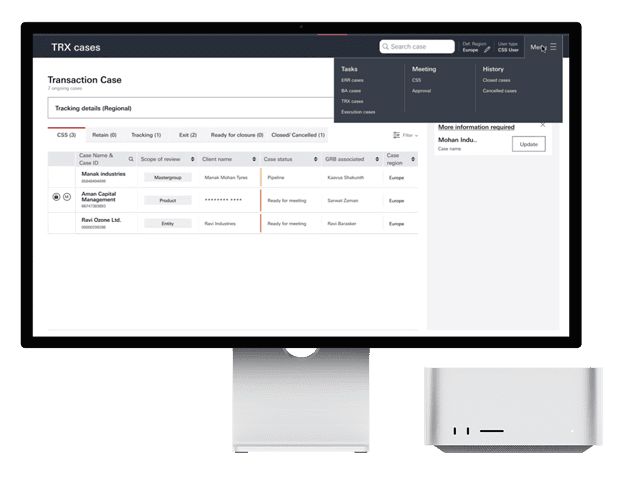

HSBC internal decisioning tool
Truly Simple, Smart and Seamless